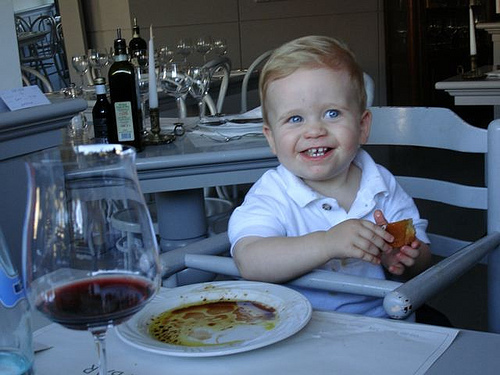
Tips for Enjoying Tuscany with a Toddler
January 31, 2009 by admin
Filed under Accommodation, Guest post, Hotels, Italy, Leisure, Misc, Self-catering, Sightseeing
Thanks for this guest post on enjoying Tuscany with toddlers to Amie O’Shaughnessy of Ciao Bambino, the travel site that brings you accomodation reviews and travel tips for enjoying your travels with the family.
Tuscany is touristy for a reason—fabulous food, incredible scenery, warm people that love children, fascinating history—the list goes on and on. When it comes to travel with a toddler—arguably the most difficult age range of all—touristy is a good thing because it means there is infrastructure to handle all of those visitors, which in turn means that parents have reliable resources to ensure travel goes as smoothly as possible. English is spoken almost everywhere—unless you speak Italian, the value of this cannot be underestimated as it ensures your needs and/or your kids needs are understood.
There are a few planning basics that should be in place to fully enjoy the region.
Stay in the countryside for a week or more
Keeping logistics to a minimum is key and nothing creates stress faster than packing and repacking multiple times during a relatively short trip. Moreover, most of the accommodations that are truly family-friendly with kitchens and private living space, have week-long stay requirements running from Saturday-to-Saturday. Happy toddlers are active toddlers and while most Italian cities have parks and piazzas that are great for running around, the countryside is ideal for young kids—especially in warmer summer months where swimming is a prime activity—and overall regional sightseeing is easier when you start from outside of the bigger cities. If time permits, plan on staying in Florence for 2-3 nights in addition to the week-long countryside stay.
Select appropriate accommodations
I wish there were as many great accommodations for families in other destinations as there are in Tuscany! What makes them work so well? For one thing, there are many different options to choose from at different quality levels and price points with room configurations that support families. Apartments with kitchen facilities, multiple bedrooms, plus a living room are easy to find. The key is to determine what other kinds of amenities you want—most properties have pools—other things that are worth considering are an onsite restaurant, fitness center, kids program, tennis, playground and/or staff that can help you do things. Independent villas are wonderful for a few families traveling together—but I prefer what we call “resort” options on Ciao Bambino for smaller groups—they are priced better for the quality than villas and families are not isolated from support and services.
Comprehensive amenity lists are outlined on every Ciao Bambino property profile page. To access an easy list of applicable accommodation options, search for “resorts” and Tuscany on our Extended Search page or you can sort by the accommodation category on our Italy Destinations page.
Set realistic goals for sightseeing
While main highways run through Tuscany and are efficient for getting across the region, most of the charming hilltop villages you will want to explore are down windy, narrow, and very slow roads.Things that look like they are in close proximity on a map may actually take quite a bit of time to get to due to the condition of the road. A classic example is exploring the Chianti towns of Gaiole, Greve, and Radda—the roads between these towns are incredibly slow—definitely worth it—but visiting just these 3 relatively nearby villages will take all day when you include lunch (not a fast affair in Italy), potty stops, parking, and of course, getting lost. A good map is a must—Touring Club Italiano has excellent, detailed maps (the key is maps that show small roads).
Favourite excursions
Italians are the best loiterers in the world and this is one of the things I love most about traveling in Tuscany. Travel in this region doesn’t have to be about “activities”—meaning structured things to do. Our best experiences in Tuscany when our son was very young are those where we explored an area or town without a particular agenda—when we were willing to simply sit in one place and let our son run in a piazza around us, giving us an amazing opportunity soak in the life around us. The reality is that toddlers will not appreciate Italian culture in a meaningful way (with the exception of gelato), therefore, the things on this list are about open space—knowing that happy toddlers are active toddlers—combined with something of interest for parents.
Siena
Once you get through the stress of parking in Siena, the reward is significant. The Piazza del Campo—the main public space in Siena—is one of the most beautiful, dramatic squares in Italy. You will be pleased and your toddler will be pleased by the car less, enormous space with hundreds of pigeons to chase.
Lucca
The historical center of Lucca lies within walls that are hundreds of years old—locals and tourists love to walk, run, and bike on the wide road that extends along the top of the walls. You can use a stroller or consider biking, as there are a number of bike rental shops that offer baby seats
Forte dei Marmi
Forte dei Marmi is an upscale, beach town on the border between Tuscany and Liguria. Unlike the better-known Cinque Terre which is not optimized for a toddler with cliffs, steps, and hazards—Forte dei Marmi has a broad, sandy, flat beach with little surf. The beach clubs are open during the summer months and allow families to enjoy the coast Italian-style with good food, coffee, and wine
Chianti Towns
The sad fact is that visiting hill towns in Chianti are a bit like visiting churches—they may all be extraordinary and different—but at a certain point they start to look the same. That said, there are many wonderful, small towns to explore and appreciate. Greve in Chianti is the one my clients raved most about over the years—the main square is picturesque and home to one of Italy’s oldest and most famous butcher shops, the Macelleria Falorni not to mention excellent wine tasting everywhere. Most of the towns are comprised of a center (centro) without cars, making exploration toddler-friendly (noting some towns are hilly with many steps.
Pienza
Pienza is in the Val D’Orcia (on the UNESCO list of World Heritage Sites)—a part of Tuscany where the landscape is unspoiled and dramatic.Pienza is a Renaissance town famous for pecorino cheese production. The views of the countryside from here are spectacular and cheese tasting is at every turn—fun for every age.
Florence is one of my favorite places on the planet, but it is not optimal with a toddler. Not impossible—but not amazing since it is very crowded and many of the top attractions like visiting museums and shopping are challenging with an impatient child. It is also worth noting that I intentionally left things off of the highlights list that would be great with school-age kids like Pisa and San Gimignano since the focus of this piece is toddlers.
One thing that is very kid-friendly about all of Italy is the food—the bottom line is that the very things that most kids love—pizza and pasta—are plentiful there. Restaurants do not have kid’s menus per se, but many will prepare whatever you want for your children (assuming it is Italian). The result is that finding kid-friendly restaurants is relatively unimportant. Note, parents should travel with a me-too type seat, since not all restaurants have high chairs.
Travels tips on Ciao Bambino has more general information on traveling with kids. Buon Viaggio!
Related Posts
Street entertainment in Piazza Navona in Rome
Gelato on the island in the Tiber in Rome
Friday photo - the lady at McDonalds in Cusco - in Peru
January 30, 2009 by admin
Filed under Peru, World, World Issues
This is the lady that my friend Joanne saw in the main square in Cuzco. She was sitting on the steps outside McDonalds begging from those who came out having got their fast food fix. I think she has a lovely dignified face, don’t you?
I found there’s a campaign on Facebook and on Youtube to keep McDonald’s out of one of the most historic squares of the old Aztec capital of Cusco. Read about it in the news here and here. what do you think? Do you eat at fast food chains when travelling?
See all the other Friday photos over at Delicious Baby here
Related Posts
A grown up backpacker at Machu Picchu
Meeting Margariette in Lima
See more of Joanne’s photos on Flickr here
Don’t miss out - get all my articles through your reader
How to set up the Featured Content Gallery in Wordpress Revolution Lifestyle
January 27, 2009 by admin
Filed under My blogging journey
If you are using Revolution Lifestyle as your Wordpress theme and need a little help setting up the Featured Content area of your homepage, then read on.
This article will tell you how I set up the Featured Content Gallery on my homepage. I don’t claim to be any expert, so if these instructions don’t work for you, then you can seek help on the Featured Content Gallery Forum or Revolution Forum where people more expert than me can answer your questions. This tutorial may also be useful if you are using other Revolution themes which have a featured content area.
Introduction
The Featured Content area is the section of the homepage below the header with several changing photos relating to posts you’ve written. You need to select which of your posts to feature in this way. I generally feature about 4 posts, normally my most recent ones, but you need to feature at least 2 posts for the featured content gallery to work.
The Featured Content Gallery is based on a plugin which you need to download. There is also a site for the Featured Content plugin with a forum where you should be able to find any help you need. The Revolution Lifestyle theme comes already set up with the Featured Content Gallery but you can also add it to other Wordpress themes. There is a Revolution Two tutorial on How to Configure the Featured Content Gallery Plug-in here, which you may like to read, although I will cover the instructions below.
Download the Featured Content Gallery plug-in
Go to the Install and set-up page on the Featured Gallery website here and click where it says Download the newest version of the Featured Content Gallery plugin.
Save the featured-content-gallery-zip file to an area of your own computer where you will easily find it again. Then unzip the file to make it a normal folder. On my computer I do this by right clicking and Extract All.
Log on to your server and upload the content-gallery folder to the Public_html/wp-content/plugins/ folder. Do not change any file or file name. If you are unfamiliar with how to do this, browse through the folders on the left side of the screen to find the content-gallery folder then browse through the folders in the right hand side of the screen to find the Public_html/wp-content/plugins/ folder. When the plugins folder is open right-click on the content-gallery folder and press Upload. Once the upload has finished, the content-gallery folder should now show within the plug-ins folder on the right hand side.
Go to the Wordpress Dashboard and click Plugins at the top right. You should find the Featured Content Gallery Plugin showing in the Inactive list at the bottom of the page. Activate the plugin by checking the box beside it and pressing Activate.
Setting up the Featured Content Gallery in the Wordpress admin area
In the Wordpress Dashboard click Settings at top right, then Featured Content Gallery from the sub menu. You will now be able to set the settings as you wish. I used this Revolution Two Tutorial on How to Configure the Featured Content Plug-in to guide me on what to put in the settings. In case you can’t view this, the suggested settings for the Revolution Lifestyle theme are;
Gallery Width in pixels: 588
Gallery Height in Pixels: 400
Category Name: Featured
Number of items to Display: 3 (In fact I changed this to 5)
The number of items to display is the maximum that will be displayed, but the number is also determined by how many posts you decide to feature. For example you may have it set to 5 as a maximum but only decide to feature 4. However, you must set up at least 2 posts to be featured, or the plug-in will not work.
You can play around with these settings, but if you are just starting with Revolution Lifestyle, I’d recommend you go with the suggested settings and get the Featured Content area working correctly, then come back to customise later.
In the Wordpress dashboard, go to Manage/Categories. From your list of categories click on the one named Uncategorised. Edit the Category name to Featured and save by clicking the Edit Category Button. Note that it is important that you change the uncategorised category to featured - it will not work if you just set up a new featured category. (Uodate - see the comments for a correction to this section by Featuredcontentgallery admin)
Writing a post to feature in the Featured Content Gallery
Write a post as normal and save as draft. When you are ready to publish, you need to do the following to ensure the post will also appear in the Featured Content Gallery.
When setting up the categories for the post, ensure you check the featured category. If you later want to remove the post from appearing in the Featured Content Gallery, then uncheck the box against the featured category. Then press Save.
To set up the photo that will appear in the Featured Content Gallery you need to find a photo which you have re-sized to close to the sizes you have set up in the Featured Content Plugin settings. If you have followed the suggested settings above, this will be 588 pixels wide by 400 pixels high. As long as the photo is close to this in size, the gallery will crop around it, but if it is double the size it will not look right. If you use Flickr, I find that I can download the medium size which is 500 x 375 pixels and it works fine.
Download your chosen photo of the correct size onto your computer. Upload the photo into the Wordpress Gallery for your post. To do this you click on the Add Media/ Add an image button immediately above your post when in the Write post function of the WP dashboard. Using the Browse Uploader, Browse to find your chosen photo, then press Upload to upload the photo into the Wordpress Gallery. Once it has uploaded you will see a link in the Link URL box which looks something like this; http://www.heatheronhertravels.com/wp-content/uploads/2009/01/butterfly-3.jpg
Copy the Link URL from your chosen photo as described above and on the Write Post page of your chosen post, scroll down to find the Custom Fields near the bottom of the page. In the Value box paste the Link URL for the photo and in the Key box type articleimg. Next time you do this step for any post, the articleimg will appear in the dropdown in the Custom Fields section. Press the Add Custom Field Button , the Update Button and then Save your post as normal.
Now publish your post. You need to repeat the step and ensure that a second post is marked with the featured category and a photo added to the Custom Field seaction, as the Featured Content Gallery does not work correctly with only one Featured Post.
Then continue to make other posts featured as you write them, up to the maximum number you have specified in the Plugin settings. As you write more and feature them, you will have to uncheck the feature category on older posts, so that you are featuring your most recent posts.
You should also consider what to write as the first line of any post you plan to feature as this is what will appear below the photo in the Featured Content Gallery. I always try to write something that summarises what the article will be about and encourages the reader to go and read that post.
I’ve tried to give you some easy to follow instructions based on my own experience, but if you need more help you should be able to get it by visiting the Featured Content Gallery Forum or the Revolution Two Forum.
Read Related Posts
Changing the Header in my Wordpress Revolution Blog
Setting up pages in my new Wordpress blog
Setting up my Feeds in Wordpress Revolution Lifestyle
Back to My Blogging Journey Home